Many thanks for the reminder.
Do we agree that this affects only large files where you want to save blocks and not re-copy the whole file every time?
Because only if you combine versioning + block level copying, you currently get Synthetic Backup, which does not keep a 1:1 copy of the latest versions.
All smaller files, you always get a 1:1 copy, and older versions in the versioning folder.
Feature suggestion: Exact mirror + Reverse Incremental Backup
Re: Feature suggestion: Exact mirror + Reverse Incremental Backup
By the way, yes I will definitely look into it this year.
I will have more time starting in November.
I'm afraid that reverse incremental for large files will cost twice the amount of block copying, and the types of destination storages where this can work is limited. Basically only local storage and SSH/SFTP is possible, because you can't move blocks between files on typical cloud storages.
Re: Feature suggestion: Exact mirror + Reverse Incremental Backup
Dear Tobias,
I'm still trying to find a reliable Windows OS solution for reverse incremental backup of files.
The idea is to use Left to right exact mirror with versioning and files deletions options to create Exact mirror + Reverse Incremental Backup functionality.
Syncovery backup profile configuration:
Left to right exact mirror backup
No encryption, no compression, no block level synthetic backup.
VERSIONING: Versioning to a dedicated directory (move into folder for the right side) is ON
VERSIONING: no versioning for the left side as left side is the source
VERSIONING: keep 9999 versions per file
VERSIONING: Renaming of older versions: add timestamp
VERSIONING: Recreate tree below one "Older" folder is ON
VERSIONING: Keep one version of deleted files is OFF
FILES DELETIONS: Move deleted files into a specified folder and remember deletion time and date are ON
FILES DELETIONS: Delete older versions permanently is OFF
Let's say I run this backup profile 100 times, therefore I have 100 snapshots of my source.
Let's say I need to restore snapshot #72.
I don't know the exact date and time when snapshot #72 was done.
When using Syncovery restore wizard, the wizard asks me to specify the exact earlier date and time in order to restore older file versions, but I don't know the exact date and time when snapshot #72 was done.
I'm aware that Synchronization Preview window allows to choose older versions of a particular file by right clicking that particular file.
But Synchronization Preview window allows to choose versions on per single file basis only.
What if I want to restore an older snapshot that consists of many files?
Does Syncovery have a feature to show all available backup snapshots to choose from when doing a restore?
Feature to show something like this:
Snapshot #1 done on 2026-09-02 11:15:31
Snapshot #2 done on 2026-09-05 13:25:58
Snapshot #3 done on 2026-09-11 15:17:51
......
Snapshot #100 done on 2026-11-07 22:47:24
I select Snapshot #72 in Syncovery restore wizard, then Synchronization Preview window shows the files and folders that Snapshot #72 contains, right clicking a particular file shows what other versions of that file exists.
Does Syncovery have such functionality?
If I understand correctly, at the moment Syncovery restore wizard is more suitable to restore a single file or a small number of files rather than whole historic exact mirror snapshots reflecting the state of source at particular point in time, is that correct?
Re: Feature suggestion: Exact mirror + Reverse Incremental Backup
By combining one way mirror sync with a database of older versions of files and deleted files, Syncovery would become a dedicated software for Reverse incremental backup of files and folders.
In reverse incremental backup, the most recent version of backup is immediately available. Contrary to forward incremental backup strategy, you don't have to run all the previous increments to restore the whole chain to obtain an up-to-date backup. But should you wish to find an older version of a document, you can still go back to an earlier point in time in reverse.
Reverse incremental backup only backs up modified data, but the last backup is a mirror of source data.
The biggest advantage of reverse incremental backup over forward incremental backup is the resilience of your backup in case of backup corruption. If corruption occurs somewhere down the reverse incremental backup chain, it will not spread to your latest backups.
For forward incremental backup it is necessary to ensure that each of the increments is not corrupted. If one of them were corrupted, it would then be impossible to recover the most recent version of the document. This is not the case with reverse incremental backup.
By using a reverse incremental backup process, you secure immediate access to the latest version of backup data. In 99.9% of cases, it's the one you want to retrieve!
Please see the image below. That's how Syncovery's reverse incremental backup repository could look like.
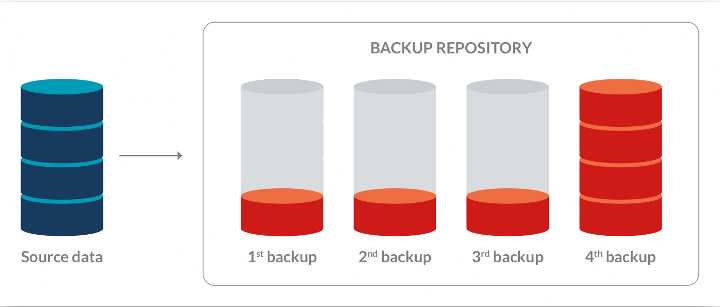
1st backup is the oldest backup.
4th backup is the newest backup.
4th backup is the exact one way mirror of Source data.
Restore wizard should display all these 4 backups chronologically from the newest 4th backup to the oldest 1st backup.
Selecting a particular backup would open up Restoration preview (synchronization preview) window showing all files, folders and directories representing the source at that point-in-time when that particular backup was created.
Syncovery seems to already have most features required to make Syncovery a dedicated software for file based reverse incremental backup. It looks that the restore wizard needs to be optimized for reliable, convenient, accurate restoration of historic point-in-time reverse incremental backups as mentioned in this thread:
viewtopic.php?t=1216
Currently, Syncovery offers data restoration at individual file level, restoring is a manual, yet quite doable activity.
But just try to restore an entire folder tree to the state it was in at a certain date/time (not being the state at the time of your latest sync): all data is there, but restoring the whole folder tree is difficult, because you have to select the required point-in-time version one file at a time.
Dear Tobias, what are your views regarding the optimization of Syncovery for file based reverse incremental backup?
In reverse incremental backup, the most recent version of backup is immediately available. Contrary to forward incremental backup strategy, you don't have to run all the previous increments to restore the whole chain to obtain an up-to-date backup. But should you wish to find an older version of a document, you can still go back to an earlier point in time in reverse.
Reverse incremental backup only backs up modified data, but the last backup is a mirror of source data.
The biggest advantage of reverse incremental backup over forward incremental backup is the resilience of your backup in case of backup corruption. If corruption occurs somewhere down the reverse incremental backup chain, it will not spread to your latest backups.
For forward incremental backup it is necessary to ensure that each of the increments is not corrupted. If one of them were corrupted, it would then be impossible to recover the most recent version of the document. This is not the case with reverse incremental backup.
By using a reverse incremental backup process, you secure immediate access to the latest version of backup data. In 99.9% of cases, it's the one you want to retrieve!
Please see the image below. That's how Syncovery's reverse incremental backup repository could look like.
1st backup is the oldest backup.
4th backup is the newest backup.
4th backup is the exact one way mirror of Source data.
Restore wizard should display all these 4 backups chronologically from the newest 4th backup to the oldest 1st backup.
Selecting a particular backup would open up Restoration preview (synchronization preview) window showing all files, folders and directories representing the source at that point-in-time when that particular backup was created.
Syncovery seems to already have most features required to make Syncovery a dedicated software for file based reverse incremental backup. It looks that the restore wizard needs to be optimized for reliable, convenient, accurate restoration of historic point-in-time reverse incremental backups as mentioned in this thread:
viewtopic.php?t=1216
Currently, Syncovery offers data restoration at individual file level, restoring is a manual, yet quite doable activity.
But just try to restore an entire folder tree to the state it was in at a certain date/time (not being the state at the time of your latest sync): all data is there, but restoring the whole folder tree is difficult, because you have to select the required point-in-time version one file at a time.
Dear Tobias, what are your views regarding the optimization of Syncovery for file based reverse incremental backup?